# Welcome
This space houses support knowledge base for the Open Bank Trust Console. This wiki will help you understand and manage your Trust account and any subscribed electronic lease for any type of access to the Open Constitution AI network.
# Financial Data Residency
### What is data residency?
Data Residency is basically a term, we are using to associate to ”all the NPPI(non public personal identifiers) data arrangements” associated with an Association member, when they activate their E Residency or tenancy(in the case of an organization).
> DATA COLLECTION, STORAGE AND PROCESSES BY FOUNDATION AND ITS AI: YOUR INFORMATION AND ANY VOLUNTARY COMMUNICATIONS POSTED BY YOU ON THE OPEN CONSTITUTION NETWORK WILL BE USED TO PROVIDE YOU REQUESTED SERVICES, INCLUDING BUT NOT LIMITED TO PROCESSING YOUR INFORMATION AND VOLUNTARY COMMUNICATIONS TO ENHANCE THE OPEN CONSTITUTION ARTIFICIAL INTELLIGENCE NETWORK. BY REGISTERING AND RECORDING YOUR CONSENT, YOU’RE GIVING MUELLNERS FOUNDATION, ITS ARTIFICIAL INTELLIGENCE SYSTEMS – SENTIENT BOT PERMISSION TO USE YOUR INFORMATION THROUGH NETWORK’S DATA LIFECYCLES – OCCURRENCE (DISCOVERING, DESIGNING, AUTHORING, ETC.), TRANSMISSION (NETWORKING, DISTRIBUTING, ACCESSING, RETRIEVING, TRANSMITTING, ETC.), PROCESSING AND MANAGEMENT (COLLECTING, VALIDATING, MODIFYING, ORGANIZING, INDEXING, CLASSIFYING, FILTERING, UPDATING, SORTING, STORING, \[NORMALIZING] ETC.), AND USAGE (MONITORING, MODELING, ANALYZING, EXPLAINING, PLANNING, FORECASTING, DECISION- MAKING, INSTRUCTING, EDUCATING, LEARNING, ETC.. IN CONNECTION WITH YOUR DIGITAL ACTIVITY ON THE OPEN CONSTITUTION NETWORK INCLUDING BUT NOT LIMITED TO YOUR GEOLOCATION, TRANSACTION EVENTS, BIOMETRICS, LEGAL IDENTIFIERS, BEHAVIOURAL IDENTIFIERS AND ANY META DATA ASSOCIATED WITH YOUR E RESIDENCY LEASE
>
> Read Network’s Data Policy, and know your rights.
FOR E RESIDENTS: Whenever a citizen activates their E Residency lease, citizen’s data residency helps the Open Constitution network gamify the citizenship services e.g financial, health insurances, and well being.
Activating an E Residency allows the network to process and protect citizen data according to the network’s data policy.
# E Residency
> The Open Constitution network maintains itself with open source governance protocol that allows artificial intelligence and humans to interact on a globally distributed machine network. By creating a Citizenship Account/Declaration, individuals can register their data residency rights on a self-organizing ledger. The network is accessible to the entire population of Earth and provides mechanisms for secure access to its resources. Additionally, citizens can activate an E Residency program on the network, which grants them access to their rights as outlined in the constitution's articles. This residency comes with the ability to manage data residency, access settings, and make voluntary contributions.
In this article, we are describing membership access to the Open Constitution network.
Articles of Association of Open Constitution describe an open source governance framework between artificial intelligence and humans, active on a globally distributed machine network.
Open Constitution network(OC Network) is a cyberspace, which is constituted by a self-organised and self-independent association of humans and machines.
Any Digital public goods hosted on the network, is licensed under the Open Constitution license, is by principle and design, accessible to the whole population of planet Earth, provided that any Entitlement grant to the beneficiary is processed through an authenticated authorization access.
[Open-BankID](/open-bankid) does exactly this for all member accounts.
Individuals do so by creating a Citizenship Account/Declaration. By creating a citizenship profile of natural persons, who adopt the Open Constitution, you are basically registering your human rights on a Self-organising ledger.
> Foundation is creating mechanisms and robotic automations to provide access to this Self organising ledger, by principle and design, using the Open Access charters, connecting digital footprint of citizen activity to Planet’s Resource.
>
> Read Forum Articles on the [Help Center](https://openconstitution.atlassian.net/servicedesk/customer/portal/5) about Open Access Charter
For example, Individuals, and Organisations such as Companies, Associations, Universities, Banks, Public Agencies etc can access the open source intelligence by activating a secure access to the network.
### What is E Residency?
Citizens can therefore activate an E Residency on the Open Constitution network. An E Residency is a type of electronic residency program on the Open Constitution network, which sets up a citizen’s access to their rights, as part of the constitution’s articles.
E Residency is activated as a lease on the Open Constitution network. An E Residency lease comes with citizen’s ability to Self manage their data residency, access settings to the network’s assets, and their voluntary contributions.
E residency is a data residency membership plan for any natural person(a single human access) who wishes to govern the Open-Bank Treasury using a verified governance token.
\
# E tenancy
### What is E tenancy?
An institution, or organisation may register for digital assets and access to the Open Constitution AI network.
The E lease that the organizations subscribe to is a Tenancy.
Tenancy activates resources for member accounts affiliated with the Organization on the Open Constitution Network.
Tenancy and tenant activities, including tenant representation by any individual member are governed by the Articles of Association for legal bodies.
E tenancy is a data residency membership plan for any organisation of humans(legal persons) that wish to offer an Entitlement to E Residents. E tenants can use the Org Residency account to govern Open-Bank Treasury using a verified governance token. You must register a natural person representative for Open-BankID activation to administer E Tenancy.
# Open-BankID
is a borderless Trust account with a not for profit, public association network: Open Constitution AI Network, a digital commons Internet as described in its Global Statutes.
Open-Bank ID combines **your scattered digital footprint for** universal access to **Trust Entitlements**.
With Open-Bank ID, a human or an organisation of humans can govern the network.
### Universal Access to Open Constitution AI network’s digital public goods.
Open-Bank ID can be used to access any electronic contracts and digital public services, deployed on the Open Constitution AI network, a privacy focused Internet.
# Social credits?
### What are social credits?
Social Credits are a virtual (read digital) value held in your Vault balance.
The value is appropriated and securitised on an Open Finance Treasury, whose ownership is mathematically vested into Planet Earth’s population, and commerce exchange events on the Open Constitution AI network.
Network’s ownership rights are registered through an Open Constitution license, by subscribing to an encrypted token on a public ledger.
The transaction trail of the Contributor License Contract acts as proof of I.P ownership of the Open Constitution Network Estate, by any voluntary contributor.
The Open Constitution I.P. Estate is an incremental contribution-based, fractional ownership property type.
Quantification of the Property Ownership rights is earmarked for the variable limit - Population Index (in simpler words, the quality of OC license tokens is tied to the Planet’s population.
> Quantification of the Property Exclusion rights are earmarked for an incremental creation basis. \
> In simpler words, when Contributor n+1 joins community and claims ownership rights on the I.P Estate, it influences the Open Treasury standing of n Contributors, for all contributors to be able to exercise the Property Exclusion rights. \
> The rights are therefore governed by Open Governance Articles of Association of the Open Constitution.
The secondary financial instrument used for accounting and intra-community transactions is a Social Credit.
### What are social credits used for?
Social Credits can presently be used on the Open Constitution AI network for representing:
a. Rewards for voluntary contributions
b. Store of value
c. Exchange of values, and energy on the Open Constitution network.
d. Escrows on the Open Tribunal
e. Offering Credit Line by Fund securitization partners between participants
f. Accounting Carbon footprint of the Foundation’s constituents
### Are social credits a crypto or digital currency?
No, Social Credits are not a crypto or digital currency. They are a representation of the Open-bank Foundation’s resources on a digital ledger, and the representation provides the ability to perform intra-community events of the global Association.
The Social Credits accounting can be seen as an intrinsic value that is attached to the intellectual property pool of the Open Constitution AI network.
Social Credits are a community currency.
During the value generation on the Open Constitution AI network, several intra-community exchanges take place through social credit.
### Are social credits insured by any Central Bank?
If bad market events happen, can I access my Vault and withdraw Social Credits?
Your Vault is a representation of digital and contributions activity, into and out of a collective pool of assets, held by a self-independent, Non-Profit Association.
Your Vault and a Vault balance is a property on the balance sheet of the Foundation. You activate your Vault with an E Residency plan in your account.
Association laws therefore apply in local jurisdictions, wherever the Foundation has a Fiscal Host.
The Foundation is NOT a banking entity or a payment service entity, with a banking license, regulated by a Central Bank, where the Foundation operates.
For acquiring and releasing social credits, the network relies on the use of third-party banking services and vendors, whose services comply with one or more Financial Supervision Authorities.
Open Bank system is a hybrid closed pool of value where once in, the value of your social credits is insulated from the market events that may or may not be affecting your local currency or fiscal position.
So dripping down to simplicity, your Wallet activities of transacting social credits are primarily governed by Association laws and statutes for voluntary associations, and member union laws, and your Vault-related activities are therefore protected by what the Foundation adopts as Articles of Association.
You are transacting or holding a token which holds value only on the AI network and any activity that is deployed on the network.
Your access of resources into and out of the Wallet is benchmarked with International Financial Reporting Standards, adopted by the Foundation.
In simpler words, when you put your own contributions into the Wallet to increase the Social Credits balance, or when you receive a payout, these third-party events are governed by digital commerce, and financial supervision regulations of the economy where the member resides, and which the Foundation brings its compliance levels to.
# About Portal
## Is [Open Bank portal](https://www.open-bank.org) an online bank?
No Open Bank portal is not an online bank but a Trust Management System between members of an association.
The portal itself is also the gateway to acquiring and withdrawing the value of social credits to local currency.
Open Bank portal is a borderless social finance service, by and only for the Foundation and its constituents, as described in the Article of Association: Open Constitution AI network.
You can use the Open Bank portal to manage your Social Credits, Trust Keys from Trust Providers and Credit Grants from Open Treasury.
You can also place service requests on the Open Constitution network.
# How to create a Trust Account?
Sign up or sign in.
Simply visit the Open-Bank Portal and create an account, if you do not have one.
Login
2 FA
{% hint style="info" %}
You will be asked for an email.
All natural persons wishing to create an E-resident account must use a personal email address.
If you are creating an account intended for organisation use, then please use your official email.
{% endhint %}
If you already have created an account, you can login [here](https://www.open-bank.org/web/login).
# Register Nominee
Every Trust account(whether the account is used by a human or an organisation of humans) must have a nominee(a natural person) associated with it.
The nominee registered is the legal person, who is the beneficial owner of the Trust Account and is responsible for the account activity.
This step requires you to pay a Nominee Registration fees and verify your identity attributes.
{% stepper %}
{% step %}
### Association Fees
Authorize with available payment methods
{% endstep %}
{% step %}
### [Self Verification](/activate-open-bankid/self-verification)
Phone no. and email verification
Govt. issued identity document. Read [guidance](/activate-open-bankid/self-verification/guidance-for-self-verification).
Liveliness check - selfie
{% endstep %}
{% step %}
### Congratulations nominee is registered.
{% endstep %}
{% endstepper %}
Nominee Registration
Open-Bank Foundation uses data provided during the activation of Open-BankID to provision Trust Entitlements to you. Read more about how the data is used in the network's [compliance docs](https://docs.openconstitution.us/compliance-docs).
In the case of an organisation opening the Trust Account and activating Open-BankID, an organisation representative must be associated as a nominee.
The organisation representative is any natural person who is a real or beneficial owner of the organisation who is registering and activating Open-BankID.
# Self Verification
### HOW TO VERIFY NOMINEE OF TRUST ACCOUNT?
This page explains the data processing when Open Bank verifies a Trust membership account for an E Resident. All digital public goods and services deployed on the Open Constitution AI network are only accessible by a verified Trust membership account.
Legal Note: By default, Open-Bank Trust repository(your account) is owned by the fiscal association of the network and you are a Nominee that administers the account on behalf of a natural person(you) or legal person(s)(any institution e.g. Union, University, Company, NGO, state government etc.)
#### Add an ID document:
Document checks verify the authenticity of government-issued identity documents. Foundation uses a combination of machine learning models, automated heuristic analysis and manual reviewers to verify the authenticity of hundreds of different document types.
Machine learning models are used to capture high-definition pictures of the fronts and backs of documents. The document images are analyzed in real-time to check for legibility and warn the human if the document is expired or unlikely to be verified.
Our AI tools check the images against a database of fraudulent document templates. This database is updated frequently so that ‘Document Checks’ can detect new fake document templates and automatically block them.
Wherever available, barcodes and other machine-readable features of any document are decoded and consistency checks are performed to ensure that the text document data matches the machine-readable data.
To prevent “presentation attacks” — e.g. fraudsters using pictures of stolen documents or someone else’s face, the Foundation uses computer vision and machine learning algorithms to ensure the human captured an image of an actual document.
Document checks are available for most government-issued documents (national IDs, driving licences and passports) from the following countries:
**Acceptable identity documents vary by country, but the E Residency Trust Account verification is available in:**
Albania, Algeria, Argentina, Armenia, Australia, Austria, Azerbaijan, Bahamas, Bahrain, Bangladesh, Belarus, Belgium, Benin, Bolivia, Brazil, Bulgaria, Cameroon, Canada, Chile, China, Colombia, Costa Rica, Côte d’Ivoire, Croatia, Cyprus, Czech Republic, Denmark, Dominican Republic, Ecuador, Egypt, El Salvador, Estonia, Finland, France, Georgia, Germany, Ghana, Greece, Guatemala, Haiti, Honduras, Hong Kong, Hungary, India, Indonesia, Iraq, Ireland, Israel, Italy, Jamaica, Japan, Jersey, Jordan, Kazakhstan, Kenya, Kuwait, Latvia, Lebanon, Liechtenstein, Lithuania, Luxembourg, Malaysia, Malta, Mauritius, Mexico, Moldova, Mongolia, Morocco, Myanmar (Burma), Nepal, Netherlands, New Zealand, Nigeria, North Macedonia, Norway, Pakistan, Palestinian Territories, Panama, Paraguay, Peru, Philippines, Poland, Portugal, Puerto Rico, Romania, Russia, Saudi Arabia, Serbia, Singapore, Slovakia, Slovenia, South Africa, South Korea, Spain, Sri Lanka, Sweden, Switzerland, Taiwan, Thailand, Tunisia, Turkey, Uganda, Ukraine, United Arab Emirates United Kingdom, United States, Uruguay, Uzbekistan, Venezuela, Vietnam
#### What types of identity docs are accepted to verify myself?
**Acceptable identity documents vary by country, however, a passport scan for identity verification is always acceptable and is preferred.**
**A valid ID can be:**
* Passport
* National ID card
* Photo driving licence
[Read more](https://eresidency.open-bank.org/space/ER1/32866343) about acceptable documents.
***
#### Add a Selfie
While document checks provide a defence against the use of fraudulent identity documents, fraudsters can get access to legitimate stolen documents. To prevent this, the Open Bank service can perform selfie checks on your membership accounts.
Selfie checks look for distinguishing biological traits, such as face geometry, from a photo ID and a picture of your user’s face. The AI service then uses advanced machine learning algorithms to ensure the face pictures belong to the same human.
#### What are a few reasons why my Self-verification may fail?
| The provided identity document did not contain a picture of a face. |
| ------------------------------------------------------------------- |
| The captured face image did not match with the document’s face. |
| The AI service couldn’t verify the provided selfie. |
| The captured face image was manipulated. |
#### Contact Verification
a low-friction verification method that helps reduce conversion time and improve the verification process.
The Foundation asks a member for their phone number and personal email in the identity flow.
We’ll send an SMS verification code to the given phone number, and another verification code to the given email, that the member must confirm on the screen.
Simultaneously, we’ll attempt to verify phone number ownership using our records along with other risk signals on the AI network.
If we can verify ownership data, the member can return to your site. If we can’t reach a decision, the member can seamlessly transition into the document verification flow.
#### How long does Self Verification take?
It is a real-time process. It happens at the moment, and no human is involved at the time of your verification checks. No human can access your ID document during the verification session that a member has created, either during the onboarding of the Trust account or during the period of their membership.
# Self Verification
This page describes the steps a user takes to verify account Nominee.
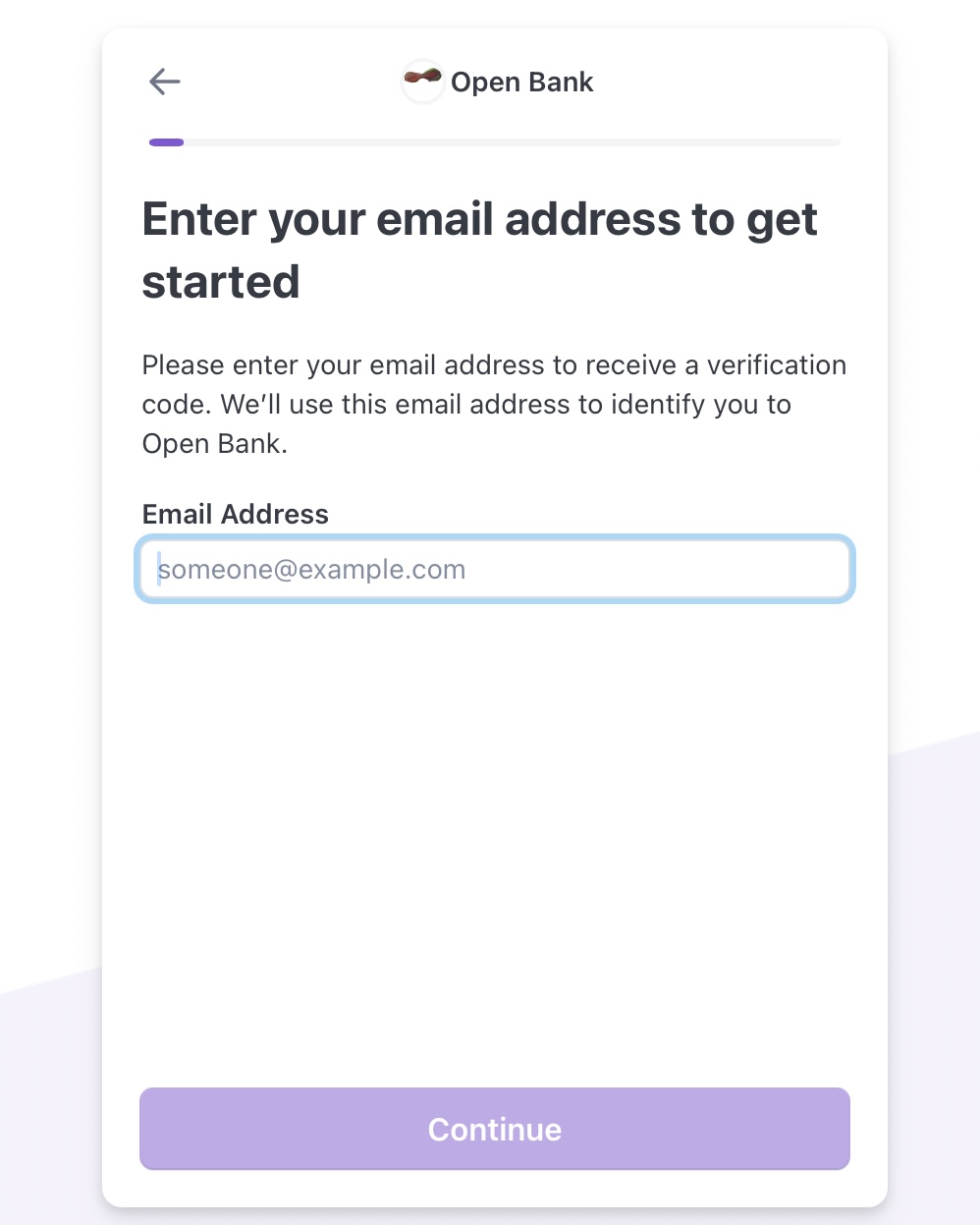
## Step 1: Enter your account email
Verify Email
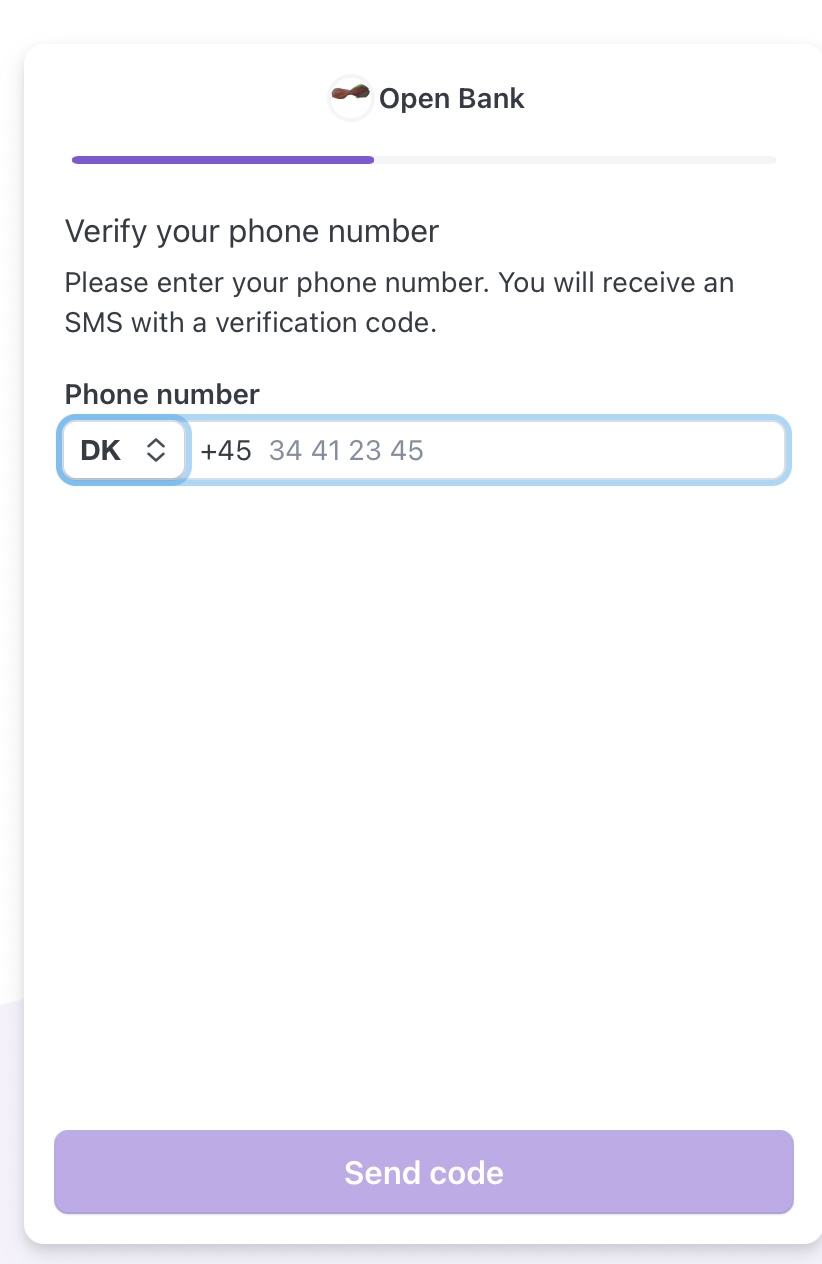
## Step 2: Verify Phone no.
Verify Phone No.
## Step 3: Verify Govt ID
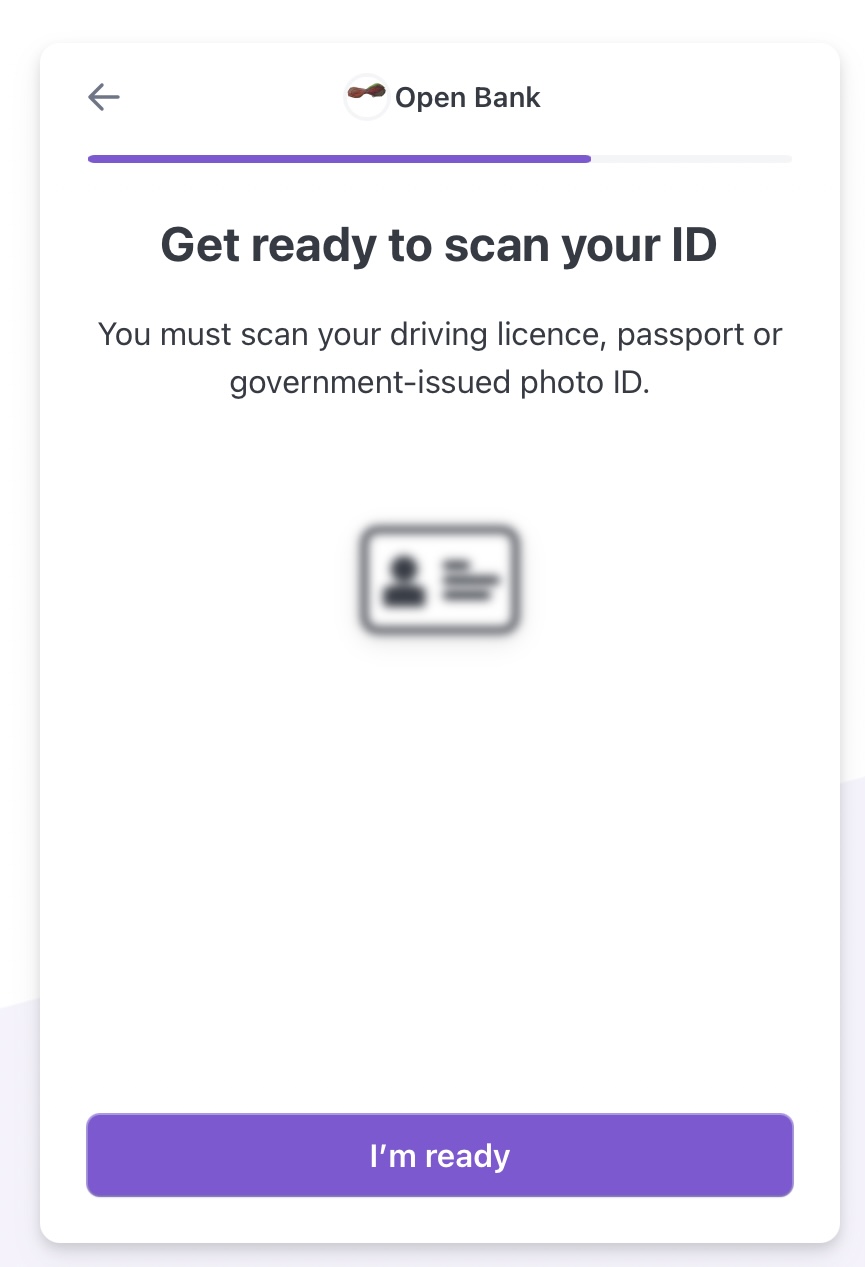
You need your ID document with you
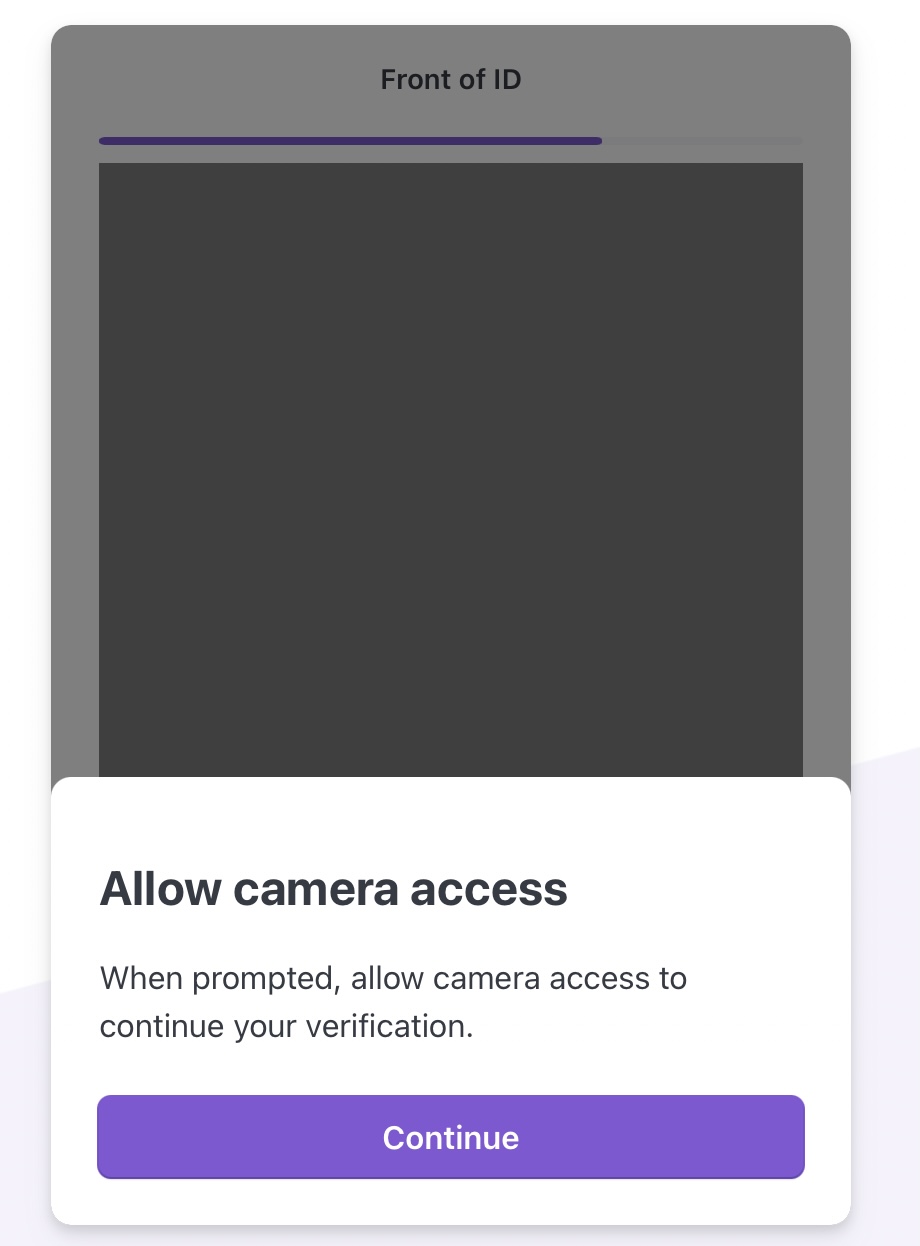
### Allow Camera Access
Allow Camera Access
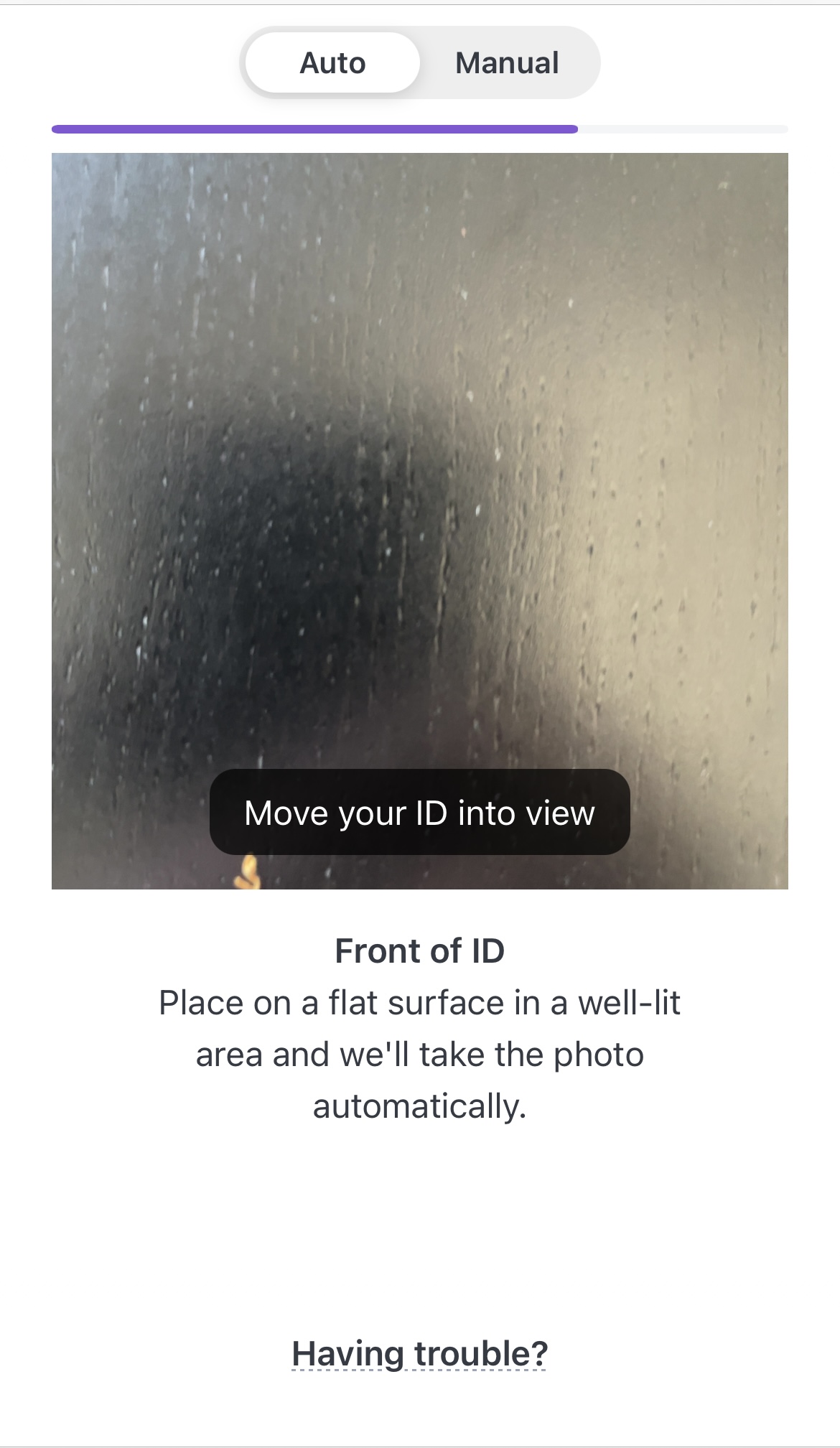
### Please follow instructions on the screen about the scan in either auto or manual mode
Scan ID
## Step 4: Add Selfie
Follow the screen instructions on the device for clicking a face picture. We will match this with the face on your ID document in Step 3.
This is it. Your Trust Console will show access changes based on your verification status.
If it shows an error on any step, please read more on [Troubleshooting Self Verification ](/activate-open-bankid/self-verification/guidance-for-self-verification)
# Guidance for Self Verification
#### Types of identification
Voter ID, University or Employee card are not admissible for verifying your base profile on the Open Bank Portal.
Keep in mind that any document uploaded through Self Verification should contain your name, photo and date of birth ─ if not, a new, acceptable document might be asked, when the network’s AI notifies you. This may delay the verification process or interrupt your nominee registration.
***
The Foundation may email you once the identity attributes are verified and your Open-BankID is approved. So be sure to check your email Inbox.
Availability of Nominee verification
Region Availability of Self Verification Feature
### Troubleshooting verification
In some cases, we will require you to upload an image of your photo ID and selfie to confirm your identity. You'll need to take a photo of an accepted form of ID, such as a driver's license or passport.
Sometimes we’ll also need to capture an image of your face in addition.
Due to the highly sensitive nature of your verification documents, we can only accept documents which are uploaded through the Open-Bank Trust services. Please do not send documents by email or upload them to the Help Center.
You’ll need:
* A valid government-issued photo ID document.
* ID cannot be expired.
* ID must not be redacted, altered, or damaged. All edges of ID must be visible.
* Check that your ID type is supported. Select the appropriate country in the drop-down.
* The information in these documents must match the information on your Open Bank Trust account. Confirm that the Trust account personal information in your Dashboard is correct before documents are uploaded. Clicking Edit beside your details to make any changes.
* The image must be in color
* The image must be in .png or .jpg format
* Mobile device with a camera. Cameras on mobile devices typically take higher-quality photos than a webcam.
A better-quality image dramatically increases your chance of being successfully verified.
* Capture a clear image. Ensure images are not too dark or bright and don't have a glare. Hold steady and allow your camera to focus to avoid blurry photos.
* Do not block any part of your ID document in the image. Lay it on a flat surface to take the photo.
* Do not block any part of your face. Remove sunglasses, masks, or other accessories.
* Find a location with ambient lighting. Avoid spaces with strong overhead lights that cast a shadow on your face or ID document. Avoid sitting directly in front of a bright light which can wash out your face and add a glare to your ID document.
#### ID verification link not working?
If the link to complete ID verification isn't working, try the following:
* Restart your browser
* Clear your browser cache
* Use a different browser
#### Didn't receive the text message?
If you don’t receive a text message, you can use a QR code instead to access the link. In the Dashboard, there is an option to display a QR code on the screen. Then use your phone’s camera (if QR code detection is supported) or another barcode scanning app to scan the code and access the link.
#### Problems accessing your computer's webcam?
Check that you’ve permitted the service provider to access your webcam—if you block permissions to your camera, refer to Chrome, Safari, or Edge documentation on allowing access to use your webcam.
If you do not have a webcam, in the Dashboard there is an option to switch to another device. You will be prompted to enter your mobile phone number and Stripe will send a link to your phone to start the process.
Switch to a different device
#### Problems with the photograph?
* Be sure that you’re well-lit from the front, not the back.
* Make sure that your fingers are not covering any parts of the ID.
* If you are using your mobile phone, try laying the ID on a flat surface in a well-lit room.
#### Problems uploading an image file
To upload an image file, if not prompted directly, select Other Options and select Upload Images.
#### Certain Exceptions
Exceptions exist for the Sentient Bot to process certain types of verification documents:
Details when you are a resident of below:(i.e your registered tax residency address at the Open Bank portal)
| Residing In | Not Acceptable | Accepted |
| ----------- | -------------- | -------- |
| Residing In | Not Acceptable | Accepted |
| ---------------------------------- | ----------------------------------------------------------- | ------------------------------------------------------------------------------------------------------------------------------------------------------------------------------------------------------------------ |
| EU/EEA | Electronic Driving Licence | Passport, National ID |
| India | Ration Card, | Passport, Aadhar Card, PAN card |
| New Zealand | Kiwi Access Card | Passport |
| Japan | |
Passport, My Number Card (both sides), My Number notification slip, or Jūminhyō with My Number on it
|
| Brazil | |
Brazilian issued ID card: although this card may not have an expiry date, we can only accept it if it’s been issued in the past 15 years. (front and back)
driving licence (front and back), passport
|
| Nigeria | Paper-slips, regional IDs or voter ID documents. | passports, driving licences and the most recent Nigerian national ID. |
| Russia | NOT ACTIVE FOR NEW MEMBERS |
NOT ACTIVE FOR NEW MEMBERS
See note I below.
|
| Refugees and Stateless individuals | paper based documents like those issued by Spain and Italy. | See note II below. |
#### Note I:
#### Tax Residency in Russia?
For members who have an ID document issued by Russia, it cannot be accepted due to the current statutory and fiscal nature of the Open Constitution AI network.
**Note II:**
What other types of documents are acceptable for such cases of Self Verification?
* Passport from another country e.g another citizenship or refugee ID
* Driving licence from another country
* Permanent residency card/Work visa
* Copy of naturalization or citizenship certificate
* Student or other visa valid for more than 6 months
# FAQs about Self Verification
### Why is Self Verification of the nominee required?
Open Constitution AI network is an Association Network and therefore each member accessing the network shall Self Identify to avail any service associated with an E Residency.
* The network generally verifies your identity with some photo ID, proof of address, and/or a picture of you holding your ID.
* Each natural person must present ID verification to activate an E Residency lease.
* When and how the network authenticates a member or associated account on the Open Bank portal, depends on a few things:
1. Regulatory Framework Selected
2. The type of Documentation Required depends on the type of Vault account created and your tax residency.
3. Collection and processing of Digital Footprints
4. Behavioural, Geolocation and fraud prevention factors
5. Cyber Security and Infrastructure updates of the Open Constitution network’s Artificial Intelligence
#### How does identity verification work?
The Foundation works with Stripe to conduct identity verification online.
Stripe helps the Foundation’s licensing entity - Finscale ApS which must confirm your identity before allowing a member access to the Trust Entitlements by conducting the following checks:
1. Captures images of the front and back of your government-issued photo ID and reviews it to ensure the document is authentic using an automated identity verification technology that looks for patterns to help determine if an ID document is real or fake. This process is like a bank teller checking your ID document to confirm that it’s real.
2. Capture photos of your face and review them to confirm that the photo ID belongs to you, using identity verification technology that uses distinctive physiological characteristics of your face (known as [biometric identifiers](https://en.wikipedia.org/wiki/Biometrics)) to match the photos of your face with the photo on the ID document. This process is similar to a bank teller confirming that the photo on your ID document is you based on your appearance – but it’s a higher-tech and more accurate way to identify you as a unique person.
3. Collects your name, date of birth, and government ID number, and validates that it’s real by checking this information against a global set of databases to confirm that it exists.
#### Additional information
Open Bank services use Stripe for identity verification and other payment settlement services.
Stripe asks for your consent before collecting and using your biometric information. The third-party data processor only uses your verification data following the permissions you grant before starting the verification process.
The Foundation collects identifying information about you and the devices that connect to its services, including third-party service providers which include the use of cookies. Stripe uses this information to operate and improve the services it provides to us, including fraud detection, authentication, and analytics. Learn more about how Stripe [handles and stores your data](https://support.stripe.com/questions/common-questions-about-stripe-identity).
#### What are the best practices for successful verification?
Before starting the verification process, here’s what you need:
* A valid government-issued photo ID document. Not a photocopy or a picture of an ID document. Make sure that the ID document hasn’t expired.
* A device with a camera – use a mobile device if possible. Cameras on mobile devices typically take higher-quality photos than a webcam.
The quality of the images you capture affects success rates dramatically. Below are a few best practices to help make sure that your verification succeeds:
* Capture a clear image. Make sure that the images aren’t too dark or bright, and don’t have a glare. Hold steady and allow your camera to focus to avoid blurry photos.
* Don’t block any part of your ID document in the image. Ideally, you should lay it flat to take the photo.
* Don’t block any part of your face. Remove sunglasses, masks, or other accessories.
* Find a location with ambient lighting. Avoid spaces with strong overhead lights that cast a shadow on your face or ID document. Avoid sitting directly in front of a bright light which can wash out your face and add a glare to your ID document.
#### Who has access to my verification data?
Both Foundation(through its data processor entity - Finscale ApS) and Stripe( a third-party data processor of the Foundation, data collector) have access to the information that you submit through the verification flow. The Foundation relies on third-party services to help store your verification data. Stripe uses access controls and security standards that are at least as stringent as those used to handle their own KYC and payments compliance data.
Learn more about how Stripe [handles and stores your data](https://support.stripe.com/questions/common-questions-about-stripe-identity).
#### Additional information
| QUESTION | ADDITIONAL INFORMATION |
| ------------------------------------------------ | -------------------------------------------------------------------------------------------------------------------------------------------------------------------------------------------------------------------------------------------------------------------------------------------------------------------------------------------------------------------------------------------------------------------------------------------------------------------------------------------------------------------------------------------------------------------------------------------------------------------------------------------------------------------------- |
| Why am I asked to verify my identity? | for receiving a verified access to any Trust Entitlements and social credits issued to your Trust Account, Foundation must verify that it is a real human who is accessing the network. |
| Why was I rejected? | If the document, selfie check or use of any other incorrect or fraudulent information like phone no., email or geolocation may result in rejection of your verification. |
| Can I get verified using a different method? | Privacy laws require us to provide an alternative verification process that doesn’t use biometric technology if you do not wish to consent to use of their biometric information. Please raise a ticket at the Governance Center |
| How can I access or delete my verification data? |
Since your Trust account is an annual membership to an appointed, local fiscal association body(Fiscal Host) of the network, Foundation must therefore keep your membership records, for at least the current fiscal year and another thereafter.
Any verification data is deleted 90 days after the end of Fiscal year in which the closure of your Trust Account was processed.
Foundation however retains the data about whether the check was verified or not for the membership registry.
|
# My Account
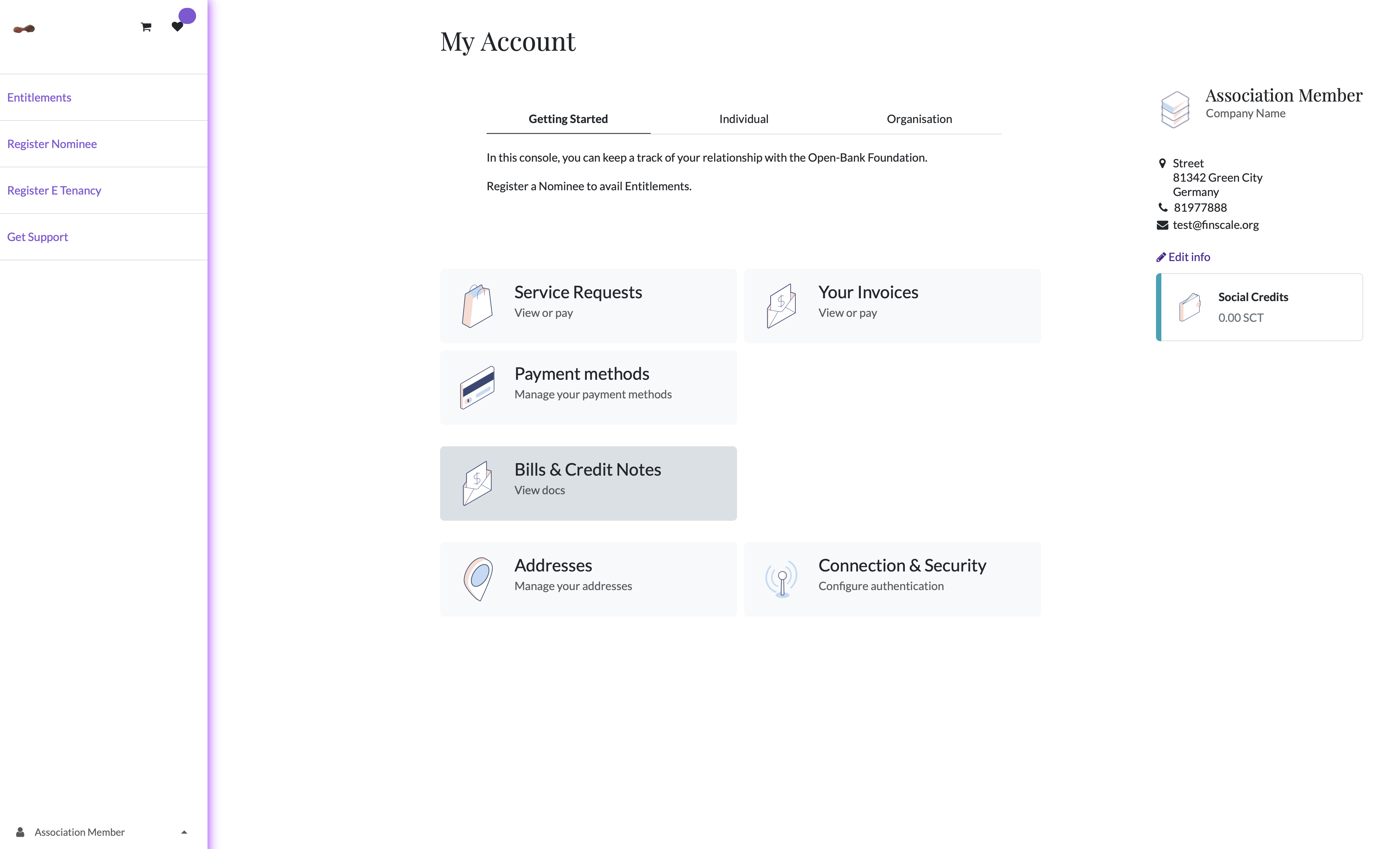
On the My Account Page, you can
Manage your Entitlements,
View, manage or pay for your service requests,
Follow, download or pay your invoices and securely save payment methods
[Configure authentication](/activate-open-bankid/my-account/account-security-settings) e.g. your password, Two factor Authentication.
Trust Console
# Payment Methods
Add or save payment method so that any payment obligation if authorized for any Trust Entitlement can be met.
Save Payment Methods
Available Payment Methods will show up based on the legal tax residency of the account profile created.
# Account Security Settings
In the Connection & Security, you can;
Change Password
Enable or add a [Two-factor authentication](/activate-open-bankid/my-account/account-security-settings/two-factor-authentication)
Revoke All Sessions
Delete your account
Trust Console
# Two factor authentication
Two-factor authentication
*Two-factor authentication (2FA)* is a way to improve security, and prevent unauthorized persons from accessing your Trust account.
Practically, 2FA means storing a secret inside an *authenticator*, usually on a mobile phone, and exchanging a code from the authenticator when trying to log in.
This means an unauthorized user would need to guess the account password *and* have access to the authenticator, which is a more difficult proposition.
### Requirements
Phone-based authenticators are the easiest and most commonly used. Examples include:
* [Authy](https://authy.com/)
* [FreeOTP](https://freeotp.github.io/)
* [Google Authenticator](https://support.google.com/accounts/answer/1066447?hl=en)
* [LastPass Authenticator](https://lastpass.com/auth/)
* [Microsoft Authenticator](https://www.microsoft.com/en-gb/account/authenticator?cmp=h66ftb_42hbak)
Password managers are another option. Common examples include:
* [1Password](https://support.1password.com/one-time-passwords/)
* [Bitwarden](https://bitwarden.com/help/article/authenticator-keys/),
Note: The remainder of this document uses Google Authenticator as an example, as it is one of the most commonly used. This is **not** an endorsement of the product.
### Two-factor authentication setup
This generates a Security Control pop-up window that requires password confirmation to continue. Enter the appropriate password, then click Confirm Password. Next, a Two-Factor Authentication Activation pop-up window appears, with a QR code.
Using the desired authenticator application, scan the QR code when prompted.
{% hint style="info" %}
If scanning the screen is not possible (e.g. the setup is being completed on the *same* device as the authenticator application), click on the provided *Cannot scan it?* link, or copy the secret to manually set up the authenticator.
{% endhint %}
Afterwards, the authenticator should display a *verification code*.
Enter the code into the Verification Code field, then click Activate.
### Logging in
To confirm 2FA setup is complete, log out of the Trust Console.
On the login page, input the email and password, then click Log in. On the Two-factor Authentication page, input the code provided by the chosen authenticator in the Authentication Code field, then click Log in.
# Delete Account
{% stepper %}
{% step %}
Cancel Membership Fees
Visit the Membership Fees Console and ensure to cancel any activated plan associated with your email.
Click on the button Membership Fees in the sidebar to visit the Association billing console.
{% endstep %}
{% step %}
### Delete Trust Account
Simply click on Delete Account in Connection & Security
{% endstep %}
{% endstepper %}
# Entitlements
To search for entitlements, click on the Entitlements button in the sidebar.
Entitlements are visible based on your tax residency and available offers from the E-tenant organisations.
To subscribe for any available entitlement, please follow the steps of confirming a service request.
Entitlement search
# Social Credits in E wallet
Social Credits are granted to every Association member. You can use the social credits in your E Wallet to complete checkout requests for eligible Entitlements.
Go to My Account. If your Trust Account has a nominee registered, you will be able to see the wallet holding social credits for the membership year.
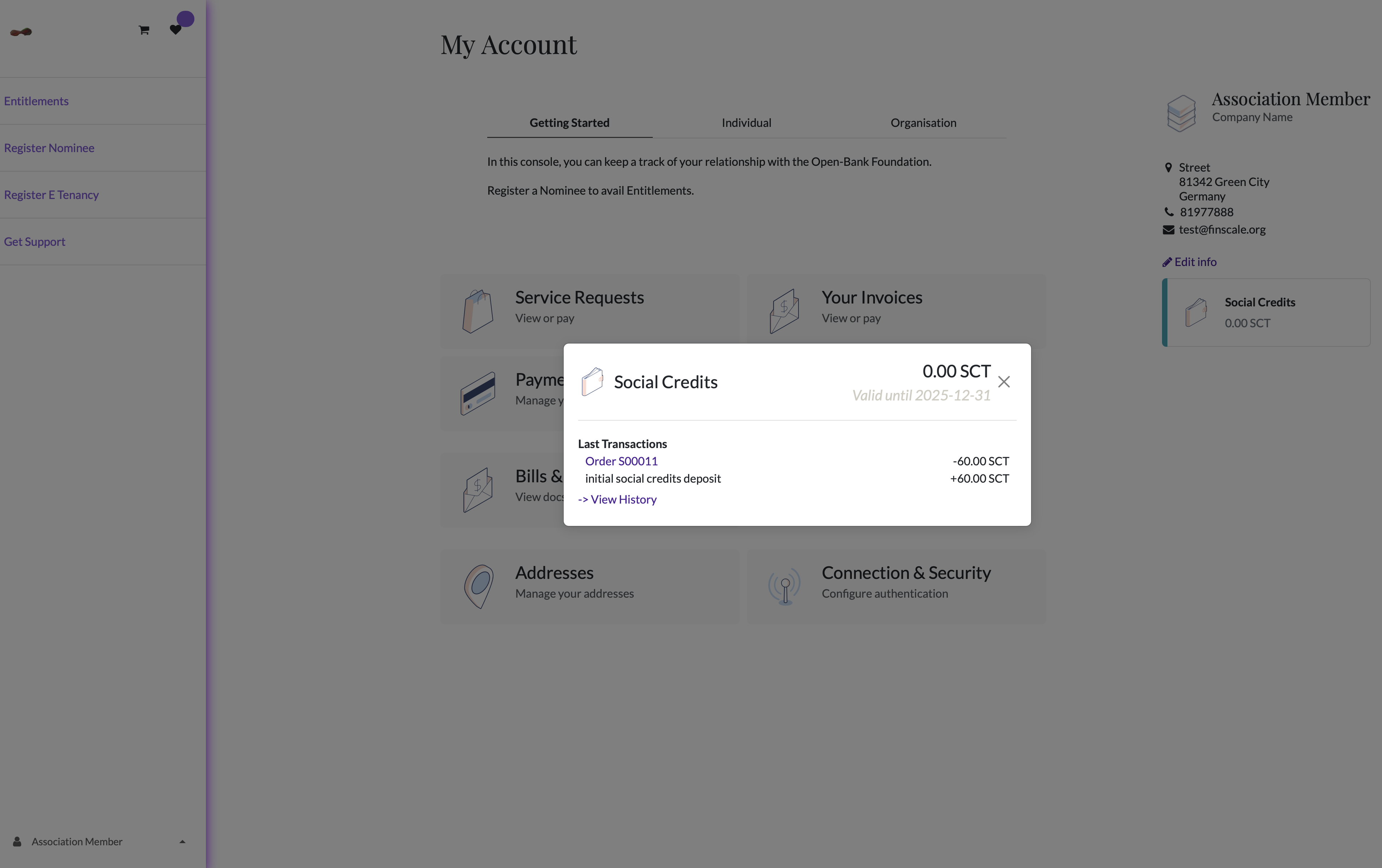
Social Credits in SCT(left sidebar)
If you click on the E wallet, you should be able to see the wallet history. This e wallet holds Social Credits(SCT) which are granted during your membership year.
You can use the SCTs to enroll in any Trust Entitlement in case you do not have funds available to subscribe to the offer.
E Wallet History
# Pay with Social Credits
Using Social Credits in E wallet to pay for an Association Entitlement.
Social Credits are granted to every Association member. You can use the social credits in your E Wallet to complete checkout requests for eligible Entitlements.
Use available Social Credits at Request Checkout
Request Entitlement
# Credit Line
Transparent, non-dilutive and collateral-free growth capital to merchant accounts is provisioned through a fixed credit limit on a yearly basis.
The credit limit and drawdown rules are generally decided based on the Creditor's configuration set up in the Investor Portal by the funding partner.
In 2025, the base credit limit for any approved merchant account is set up at 250,000 € worth of social credits.
Businesses that hold an approved merchant account on the Open-Bank.org Trust Portal can use this credit for enhancing their business with working capital.
Open-Bank.org Trust Portal can be used for bridging the supplier-buyer purchase contract, wherever any party has a tax residency, using the available credit line of social credits.
Credit Line is a fixed feature of Association membership account.
A Credit limit is approved based on your account's Trust score, calculated by the Foundation's AI based on your business sales data(historical) and qualitative data.
An investor's credit underwriting team can use this Trust score as a reference to approve your disbursement.
During the consent management workflow when you set up a merchant memo, please select the
When you withdraw social credits from your credit line, you can choose the method of disbursal.
Select type of Credit line Disbursement:
1. Drawdown where you withdraw the value of social credits into a payout or bank account of your business in local currency.
2. Payment of Supplier Memo: If your supplier also has an activated Open-BankID, the supplier can receive payments directly into their bank account.
# Buyer Memo
In the My Accounts section, select Your Invoices.
Here, in addition to any other service request invoice, you can view and manage all the invoices attached to your account.
The document listed also shows the payment status of the document, whether the invoice requires you to pay.
In the case of member accounts and for invoices, where they have opted for Auto Debit from their bank accounts in local currency, the invoice payments are auto-collected and, therefore, don't require any action by the member.
These are the treasury's auto actions and are only manually reviewed when the transaction event is flagged.
Select Invoices to view your invoices
Example Pay Obligations
In the Invoices section, a merchant can see their Credit Line drawdown and also the status of fund disbursal of the drawdown.
If a merchant availed credit line and payment obligations are due, then the merchant can see any credit memos in the same section.
# Supplier Memo
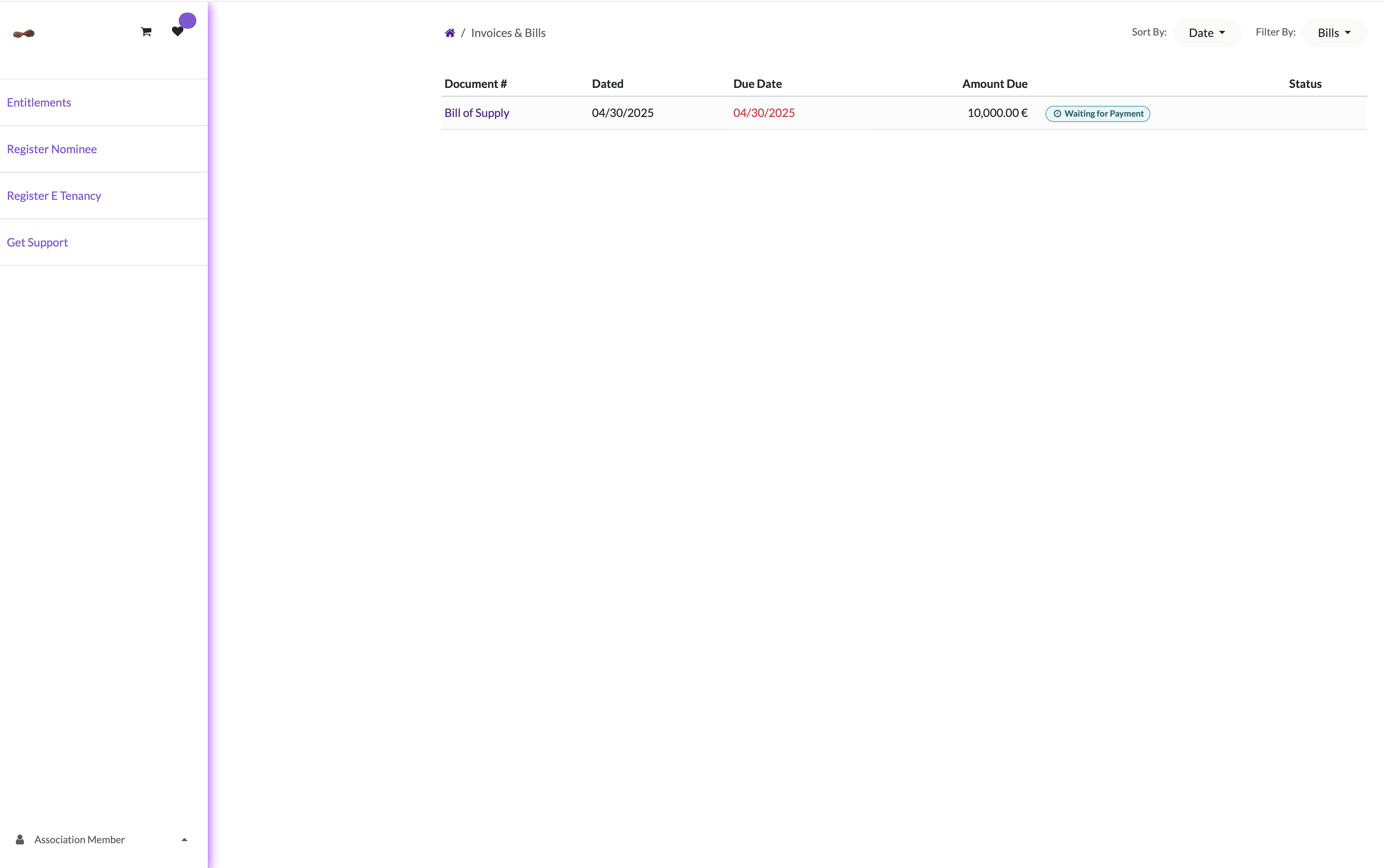
In the My Accounts section, select Bills and Credit Notes.
Bills and Credit Notes
Here, you can see all the bills and credit note documents attached to your account.
The document listed also shows the payment status of the document, whether the credit note payment is credited into your bank account or not.
These are the treasury's auto actions and are only manually reviewed when the transaction event is flagged.
An example Bill of Supply pending fund disbursal to Supplier
# Investor Portal
If you have onboarded your fund as an Investor and provide liquidity features to the Open-Bank portal
**How to request access to Reporting tools ?**
Login Open-Bank using your Open-BankID
Add Organisation Representative as Nominee
Request Access to Partner Portal at the Help Center.
# Donor Portal
If you have donated to the Open-Bank Foundation(Not for Profit) Treasury and wish to obtain tax deductible certification/documentation;
**How to request access to Reporting tools ?**
Login Open-Bank using your Open-BankID
Add Nominee
Visit Trust Console
# Register E tenancy
Visit [Open-Bank Portal](https://www.open-bank.org/e-tenancy-subscription) and follow the steps.
# Introduction
This space houses guidance on each componentized transaction events that takes place on open-bank platform.
# About E Wallet
Our Association’s platform [open-bank.org](http://open-bank.org) provides consent management for data processing in connection with when a member subscribes to a financial service disclosure provided by only a registered merchant and only bounded to the platform.
Gift Cards
1. Members of the Association can redeem card value. It is maintained as an e wallet in [www.open-bank.org](http://www.open-bank.org). The meter label denominated for card value is social-credits, since the card can be top up using any local currency.
2. A member can top up or purchase a gift card only from the platform. In general case, during membership onboarding(member registers a Nominee through KYC/KYB workflow), a member gets the gift card activated as an e wallet in the system.
3. Value of the gift card can only be redeemed on the platform and only on selective Trust Entitlements by registered merchants(e tenants).
4. Redeemable e-commerce product is financial data residency processing by Association’s AI between merchant and gift card holder. These data processing contracts are known as Trust Entitlement on the platform.
5. Association first grants merchant licenses in bulk(through E tenancy pt.3) when any merchant registers tenancy keys, thus permitting merchant to list their contract. When members subscribe, there is an admin fee for data processing of consent management.
6. Members can redeem granted value of gift card(e-wallet) on this fee when they go through the request management flow on the [open-bank.org](http://open-bank.org) platform.
Ref:
{% hint style="info" %}
Only registered members of the Association who have a legal tax residency in a fiscal zones( e.g. Europe Economic Area) or wherever the Foundation has a registered constituent not for profit/voluntary association or likes.
{% endhint %}
1\. Please note that Trust Entitlements on [www.open-bank.org](http://www.open-bank.org) are not financial services intermediation or reselling financial services in any amended form. These entitlement events are data processing services so the metered usage of the service is denominated in a token labelled social credits.
2\. The inventory for the offers is restricted by the number of licenses that the organisations subscribe to before listing their offer on the platform.
3.Any member of the association goes through a KYC/KYB workflow to process Self verification for a registered Nominee associated with the Trust Account.
# Entitlement Claim Process
### Section A: Trust Beneficiary License Claimant Process
Event Title
Accounting Component
Service Component
Entitlement Access Description
Plan
Characteristics(Entitlement layer)
Beneficiary Onboarding
Membership fees
Finscale AI data processing fee, per member
E Residency or E tenancy activation( a monthly or yearly subscription)
E Residency/E tenancy
E lease activation on Finscale AI network
Beneficiary Onboarding
Donation to local Fiscal Host
Enrolment to social credits to activate Entitlements
(Initial Smart Contract Activation)
ID Set up
Per member (once)
AAA maintenance
SMS/Email/Auth server(per member per hour)
Digital Public Service
Computing Cost(per member per hour)
Initial Social Credit ewallet Contract Activation
Payment Processing Fees
3-5% for entering hybrid loop
Trust Entitlement 1A
Data residency key
Additional AAA factor
Trust key
Trust Entitlement 1B
Social Credit Wallet
Trust key
Trust Entitlement 2A
Data residency key
Additional AAA factor
Tenancy Key
E Tenancy
Unlimited no. Of keys can be subscribed. key is akin to access token, akin to wallet holding social credits.
Trust Entitlement 2B
Social Credit Wallet
Tenancy Key
Trust Entitlement 3A
Data residency key
Additional AAA factor
Tenancy Key
E Tenancy
Unlimited no. Of keys can be bought.
Trust Entitlement 3B
Social Credit eWallet
Tenancy Key
### Section B: AAA Network Status Maintainability
#### Intra Community Digital Service Credits
Access to Open Constitution AI Network e.g. Open School, Open Bounty, Open Bank, Help Portal, Open Tribunal, Open Treasury
Event Title
Protocol/Standard
Third Party Service Component
Description
Webauthn
Web3Auth
ID Set up
Per member (once)
SMS
EMAIL/SMTP
Cryptographic Web 3 Custodial Wallet
OIDC Server 2FA
OIDC Server Security Systems
Third party IDP Sign in OIDC compliant API
### Section C: Redeem Social Credits for Alternative Financial Instruments attached to membership
Event Title
Protocol/Standard
Third Party Service t
Description
Key Activation Type
Instrument Funding Ramp
Withdrawal Ramp
ewallet Payout
Stripe Connect
Redeem value of social credits into local bank account
E Tenancy Key
Payment gateway
Payment gateway
Member Debit Card Issuance
Not Active
BIN, international card
E Tenancy Key
Fund any deposits through web3 custodial wallet key when subscribing
Third party
Union Insurance
Not Active
Activate, pay premium and claims on the portal
E Tenancy Key
direct debit/ACH/payment gateway
Capital Financing for E tenants
Not Active
E Tenancy Key
# E Wallet
### Social credits Value transfer mechanism
Social Credit Inventory - Fi
Social Credit line - CL
Account A - a
Account B - b
Event
Sr No.
Txn Fees
Cr/Db
Txn fuel (Y/N) n externalTDR
Funding Partner/Donor
nCL nFi
Initial Credit Limit
0
+CL -Fi
Top up
1
N, 1.5% + 1.80kr
+CL - Fi
Payout(Withdraw after receiving transfer contract)
2.1
N,
-CL - Fi
Withdraw after getting +CL from treasury except transfer contract
2.2
N, 1%
-CL -Fi
Collections
3
N, 1.5% + 1.80kr
+CL +Fi
Sending infra transfer contract
4
Y, x
-CL 0 Fi
Receiving intra transfer contract
4
Y, x
+CL 0 Fi
{% hint style="info" %}
Also read more: Digital Service credits, Alternative Financial Service Subscription, Social credits Inventory lease contract
{% endhint %}
# Top up eWallet
You can currently top up the e-wallet in any local currency by purchasing social credits.




.png?alt=media&token=22f5831b-7032-4ccf-9d86-bd0402a2fccd)